 December 11, 2025
  2 min read

What’s New
-
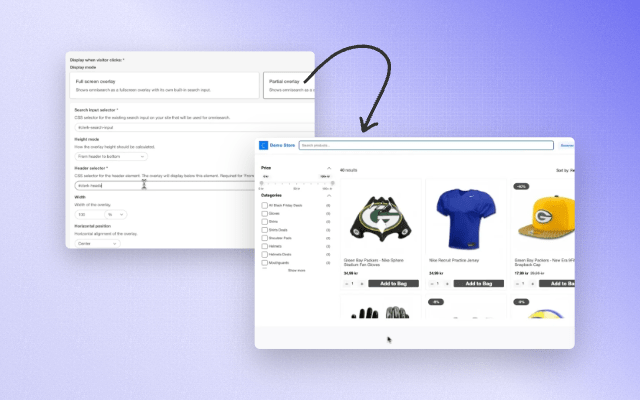
Partial Overlay Mode Choose between full-screen overlay (default) or a new partial overlay that sits below your existing header.
-
Requires only a search input selector and a header selector.
-
Design-Integrated Omnisearch Remove default Omnisearch header blocks to seamlessly blend the search experience with your own site design.
-
New Display Controls Height modes: Full height (header → bottom)
-
Percentage of viewport (e.g., 80%)
-
Fixed height
-
Max height
-
Width options: define any width under 100%
-
Horizontal positioning: center, left, or right — useful when using a custom width
-
No coding required — configure everything directly inside the element settings.
Why It Matters
- Maintain your existing UX while adding a powerful search experience
- Create a cleaner, calmer UI with less visual takeover
- Get full control over placement, sizing, and alignment
- Ensure Omnisearch fits any design system, from minimalist to highly customized layouts
Feedback
We’d love to hear how this update helps your store’s international shoppers. As always, you can reach our team at support@clerk.io with feedback or questions.