 July 2, 2025
  2 min read

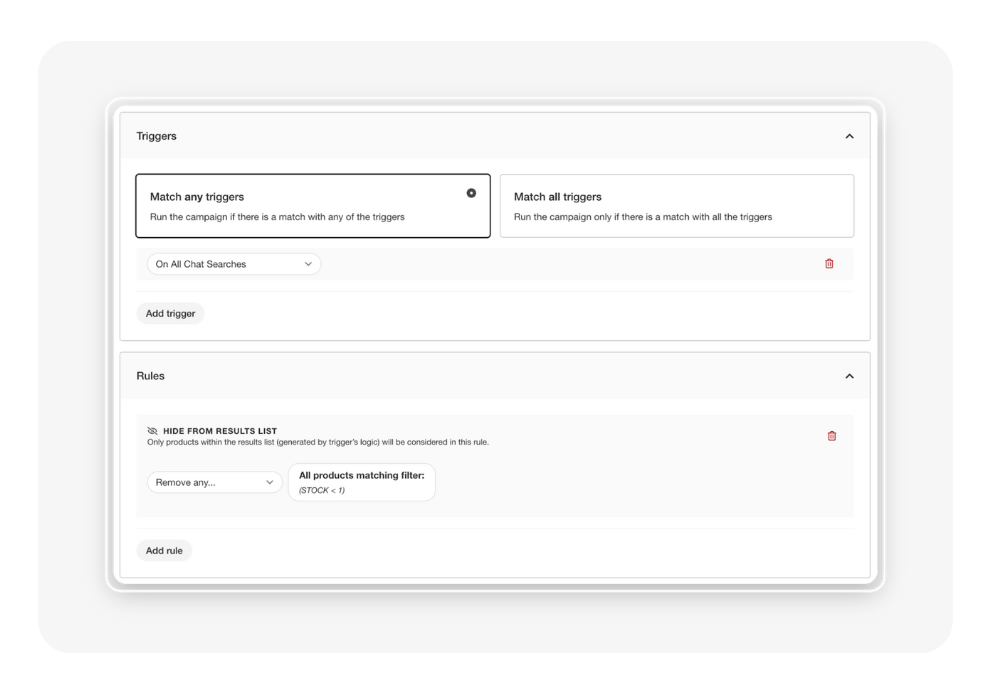
With Chat Merchandising, you can now fine-tune which products are shown in response to customer search queries within chat, using targeted triggers and rules.
Where to find it
You’ll find Chat Merchandising under my.clerk > Merchandising, alongside your existing merchandising campaigns.
What’s included in this first release
This initial release introduces a focused set of Triggers and Rules, designed to give you more control over product visibility in Chat.
Triggers (new)
- On All Chat Searches – Apply rules to every search performed within Chat.
- When a Chat Search Contains Exactly – Apply rules when the entire configured phrase is matched within the user’s search input. Example: If the trigger is set to “black dress”, it will match:
Rules
- Remove Any – Exclude specific products from appearing.
- Show Only – Restrict results to a defined set of products.
Use Case Examples
- Remove out-of-stock items when users search in Chat - keep experiences clean and frustration-free.
- Highlight premium options when someone searches “best headphones.”
- Suppress seasonal items for out-of-season queries like “Christmas gifts” in July.
Important Notes
- Chat-specific only: Existing merchandising campaigns do not apply to the Chat product. Similarly, campaigns built with the new Chat triggers will only affect Chat and no other channels.
- Best practice: For the most reliable results, always create separate campaigns for Chat triggers. Avoid mixing Chat and non-Chat triggers in the same campaign. As always, we’re here to support - reach out in product-feedback with any issues or feedback, and feel free to ask any questions you might have in this thread.